
|
|
|
|
|
|
Techniques |
|
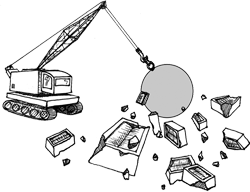
7. Demolish walls of words. Solid blocks of text are intimidating. Break them up.
Use bulleted lists for items or choicesIf you have a selection of different items separated by commas then try writing them as a bulleted list. Use numbered lists for instructionsIf you want people to do things in a specific order, such as following instructions, then use a numbered list. Use visuals when they helpHere are some of the places where something visual may help:
Try to make sure that any visual element that you use is beautiful or useful. Use tables to organise repetitive text or dataThink of tables as a collection of 'if... then' sentences. Read the first column as the 'if' part of the sentence, and the other columns as the 'then' parts. We put an example just above. |
|
Screen readers, used by blind people, can't 'see' the meaning of a table. Check that your table makes sense when it is read row-by-row across the table. Evaluating the usability of web photos shows how a checklist can help you to decide whether a photo is working for you. The idea of breaking up solid blocks of text has been around since journalists started using headlines in the 1870s.
chapter 11: Using lists and tables chapter 13: Using illustrations effectively |
© 2004 - 2024
Editingthatworks.com
by Caroline
Jarrett is licensed under a Creative
Commons Attribution 4.0 International License.